
🍃Experiment 1 - Optimization with Default Settings
In Lady H.'s experience, real-world projects often begin with building a prototype, which typically starts with a baseline result that will later be compared to improved solutions. To quickly generate this baseline, an efficient approach is to select one or more models and experiment with their default settings.
With this in mind, Lady H. set out to test the capabilities of FLAML and Optuna using their default configurations.
LGBM for Dataset Leaves30
She started with a simple case, using LGBM (LightGBM) with default settings to classify the 30-class leaves.
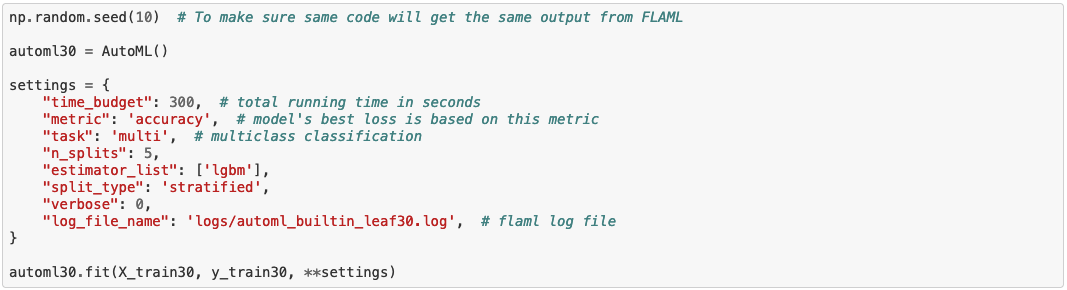
In FLAML, using the default settings requires only the creation of an AutoML instance with a few key parameters, such as the time budget, validation metric, estimator(s), and log location. By specifying n_splits and split_type, FLAML is instructed to perform 5-fold cross-validation with stratified splitting in this case. Although FLAML can automatically choose between cross-validation and holdout, once the user specifies the preference in the AutoML instance, FLAML will follow the user's choice. In this example, FLAML is set to run 5-fold stratified cross-validation.
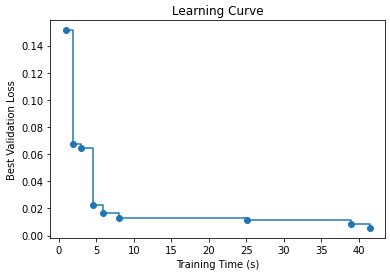
The log file captures information from each trial, allowing us to plot the learning curve at the end of the optimization process, as shown below. As we can observe, improvements occur more quickly in the early stages, but as the process progresses, it takes longer to achieve further performance gains.
🌻 Look into FLAML experiment details >>
To use Optuna's default settings with cross validation, users need to use its integrated CV functions, such as LightGBMTunerCV() function. However, not every supported model has integrated CV methods.

🌻 Look into Optuna experiment details >>
Given the same 300 seconds time budget, Optuna got a bit better testing performance, but none of their results is ideal.
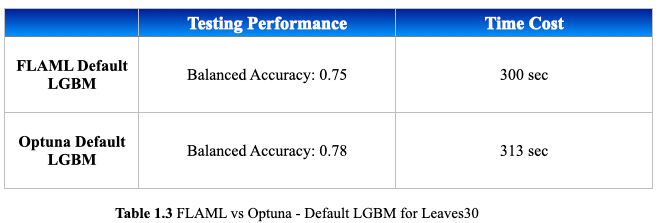
It is a good practice to train the optimized model on the entire training dataset before evaluating it on the test data. This ensures the model has been trained on all available cases, reducing the risk of bias in the evaluation. When comparing the code, you may notice that this step is included in Optuna but not in FLAML, as FLAML automates this process at the end of its optimization.

Multi-Learners for Leaves100
Next, Lady H. plans to experiment with a larger dataset and explore different search strategies, aiming to gain a more comprehensive understanding. The dataset, Leaves100, consists of 100 classes and 192 features, each class contains 16 records. This makes it a high-dimensional, multi-class dataset.
FLAML has 2 main suggested search strategies, CFO and Blend Search.
CFO is a search algorithm designed to address the large training cost variation caused by the hyperparameters. It starts from a low-cost initial point and gradually moves towards low-cost region with self-adjustable step size. At the same time, it attempts to avoid high-cost and high-loss hyperparameters. Meanwhile, the randomized restarting logic is trying to reduce the chance of getting trapped in a local optimum.
Blend Search is a better option for a large search space. Combining the benefits of local and global search, it has an economical way to decide the exploration path. Same as CFO, Blend Search starts with a low-cost initial point, but different from CFO, it will try new starting points without waiting for the local search to be fully converged.
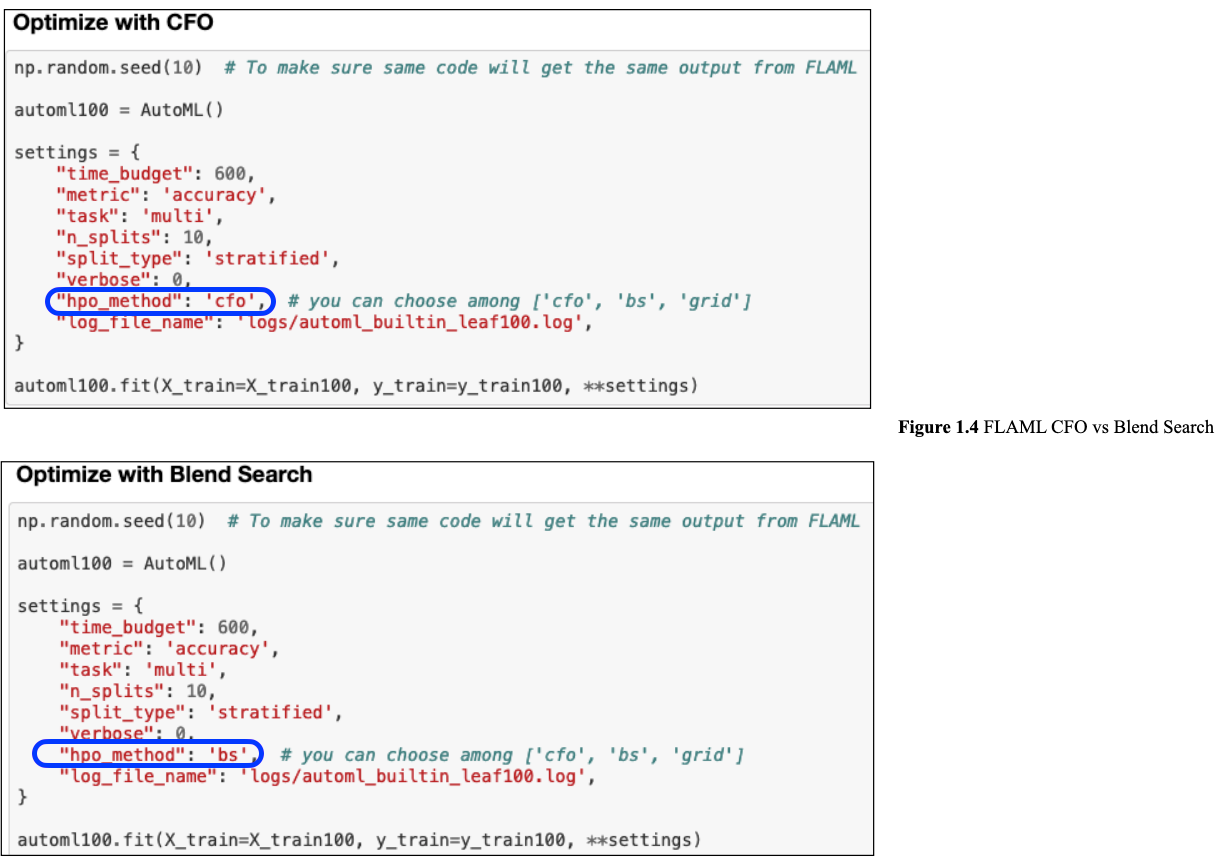
To use CFO or Blend Search in FLAML, users only need to specify the hpo_method in their settings like what you are seeing in Figure 1.4. What's more, in the settings below, it doesn't specify estimator_list as the experiment for Leaves30 above, so FLAML will use its default learner list which contains LGBM, XGBoost, Random Forest, Catboost, etc.
🌻 Look into FLAML experiment details >>
FLAML uses CFO by default. Optuna uses TPE (Tree-structured Parzen Estimator) as its default search strategy.
TPE applies bayesian theorem P(y|x) = P(x|y) * P(y) / P(x).
P(x|y)means, given the objective function's score y, what's the probability of this set of hyperparameters x. When there are multiple hyperparameters in a set, bayesian formula assumes they are independent from each other, and this is also why TPE is an independent method in Optuna.In each trial, for every parameter, TPE fits two Gaussian Mixture Models (GMMs): one,
l(x), to the set of parameter values corresponding to the best objective values, and another,g(x), to the remaining parameter values. It then selects the parameter valuexthat maximizes the ratiol(x)/g(x).
Random search is a common search algorithm implemented in many HPO tools, it selects hyperparameter sets randomly in order to find the optimal solution, and has been proved to be efficient. Since TPE and random search are the most recommended methods in Optuna, Lady H. experimented with these 2 methods. In Optuna, the search strategy is called as "sampler".
To use Optuna, even with default model settings, we need to create the objective function first, and for multi-learners scenario, we need to write the code for each learner as shown below. Because in FLAML experiments, Lady H. observed that LGBM and XGBoost appeared to be most outstanding models (set verbose > 0), so in Optuna, she only chose LGBM and XGBoost in the learner list.

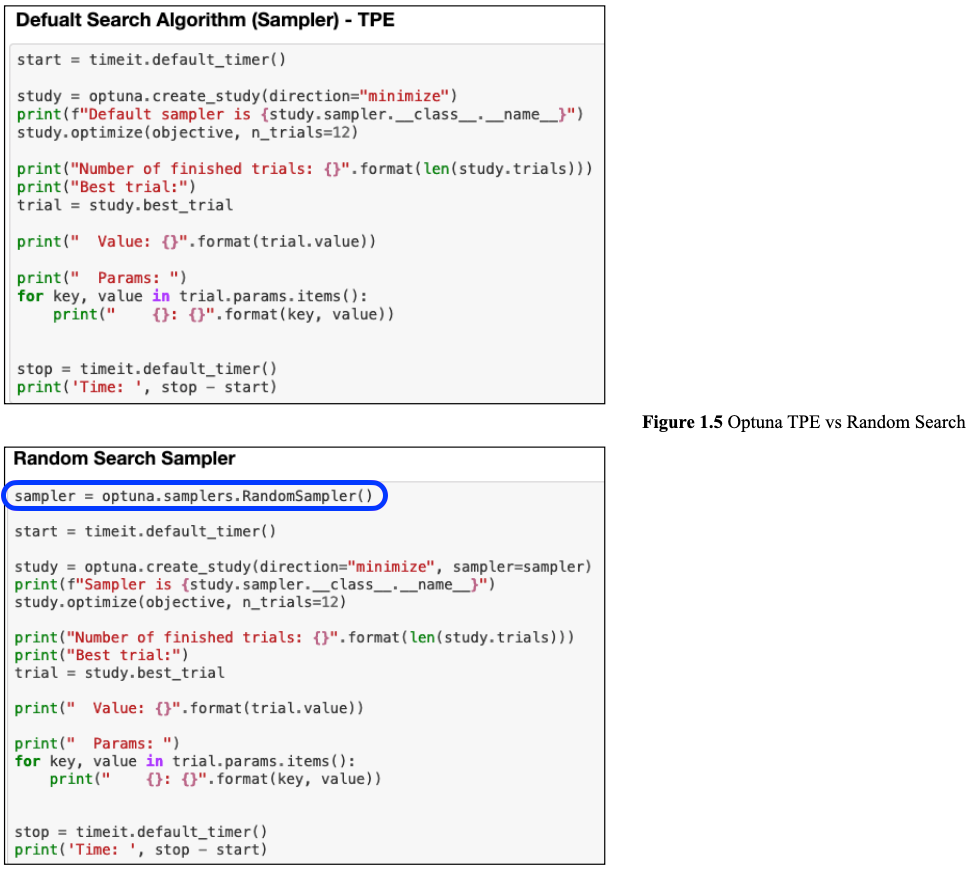
Then to select TPE or Random Search, we can specify the sampler as shown in Figure 1.5. TPE is the default sampler, so we don't have to specify it.
🌻 Look into Optuna experiment details >>
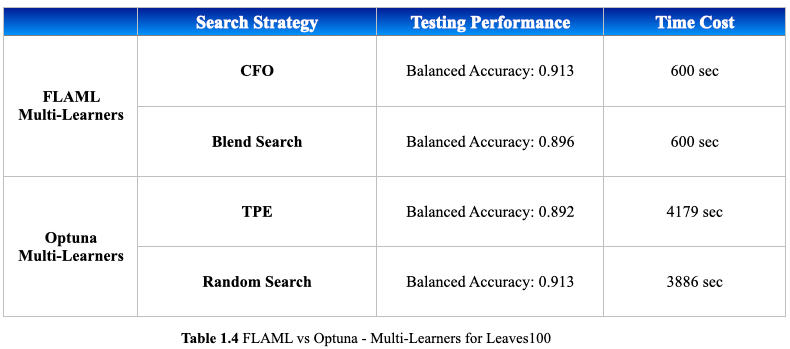
The performance difference on the Leaves100 dataset is more pronounced. While both methods achieved similar balanced accuracy on the testing data, FLAML took only 10 minutes, whereas Optuna took over an hour, despite FLAML tested on more learners. Additionally, FLAML's CFO outperformed Blend Search in terms of the testing performance, which is expected since the search space in this experiment was not very large due to the use of default settings. According to FLAML researchers, CFO is chosen as the default search strategy because it often performs better than Blend Search in many practical scenarios.
Besides the difference in the overall performance, we can also see FLAML saves much more coding efforts when we just want to experiment with default settings, thanks to the automation design in FLAML.
Last updated